Where do your customers check their order status? Are you still sending them to a generic carrier page like most stores? Or do you have a small tracking widget on your homepage that says “Powered by [tracking platform]”?
If so, you are ignoring one of your most valuable marketing channels.
According to a report by Verte, 91% of shoppers actively track their packages, and 39% check the status once a day.
By not having a branded tracking page, you’re missing a big chance to engage customers and encourage repeat purchases at the moment they are most excited about their order.
In this article, we’ll cover what a branded tracking page is, how it benefits your business, and provide step-by-step instructions to set one up for your store.
What Is a Branded Tracking Page?
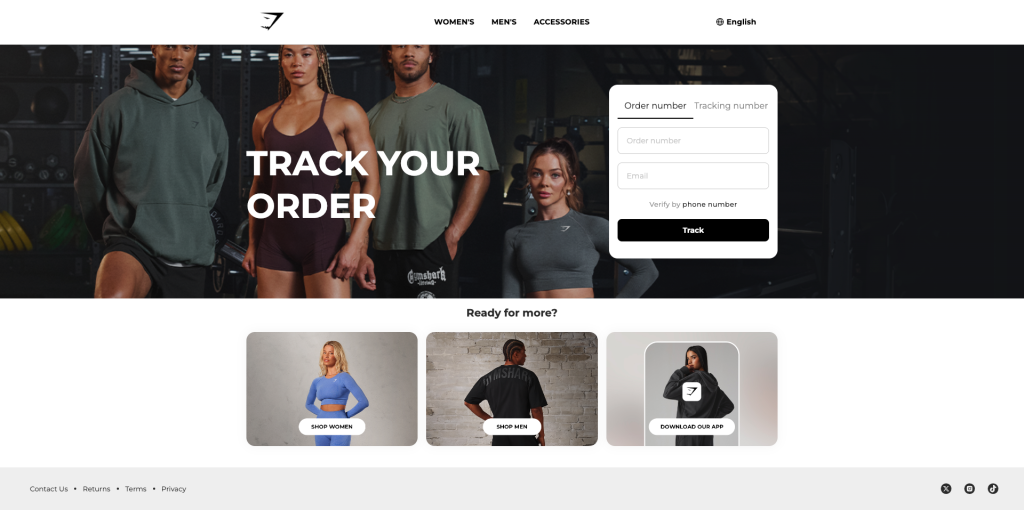
A branded tracking page is a customer-facing page where shoppers can track their order status in real time. By entering a tracking number or order ID, they can instantly view the latest delivery updates and the current location of their package.
Beyond order tracking, it also serves as a powerful marketing touchpoint that keeps customers engaged with your brand after checkout.
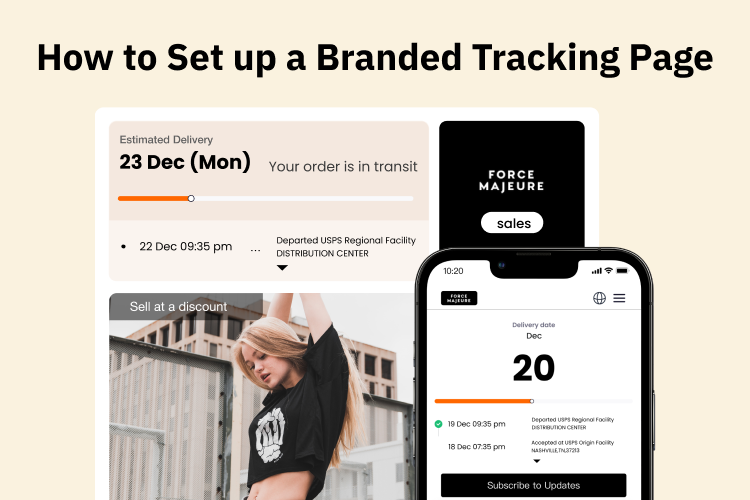
You can customize the page with your logo, brand colors, social media links, and even product recommendations. By displaying top-selling items and customized product recommendations with special offers, you can motivate customers to make repeat purchases.
For customers, a branded tracking page provides real-time tracking and full visibility into their deliveries. For businesses, it reduces WISMO tickets, improves customer satisfaction, and drives additional sales.
Why Your E-commerce Business Needs a Branded Tracking Page
Many stores make the mistake of sending these customers away to a generic carrier website, such as UPS or FedEx. By keeping them on your own branded page instead, you turn a simple delivery update into a valuable part of the shopping experience.
Reducing “Where is my order?” Inquiries
Where is my order (WISMO) queries are one of the biggest challenges for ecommerce businesses.
Let’s be honest: instead of finding a long tracking number and pasting it into a carrier’s site, most customers will simply email your support team instead.
However, a branded order tracking page changes that. Customers can quickly check the latest status of their orders using their order ID or tracking number. They’ll see exactly where their package is and when it’s expected to arrive, just with one click.
With a live order tracking page, WISMO queries can drop by at least 60% while improving your customer satisfaction.
Improving the Customer Post-Purchase Experience
Delivery visibility is increasingly crucial for the customer post-purchase experience. Even loyal customers naturally worry about whether they can receive their packages on time.
A branded tracking page can show every step of the journey—from “order processed” to “out for delivery”. And some advanced ones can even provide estimated delivery windows and tracking updates in the customer’s local language.
Such a transparent and personalized tracking experience reassures customers and fosters lasting loyalty to your brand.
Creating New Marketing and Sales Opportunities
Do you know that your tracking page gets tons of traffic? McKinsey & Company’s ecommerce delivery report shows that about 50% of online shoppers actively track their order status to make sure their packages are coming on time.
This is the perfect spot for cross-selling and upselling.
Imagine a customer who just bought a skincare cleanser. When they check their order status, the first thing they see could be a banner highlighting a seasonal sale or a discount on their next purchase.
As they scroll down to see where their package is, they notice suggestions for complementary products, like a matching moisturizer or serum.
Suddenly, a routine tracking page becomes a moment to delight, inform, and even inspire another purchase.

Strengthening Your Brand Identity and Recognition
A branded tracking page reinforces your brand every time a customer checks their order. Unlike a generic carrier page, it keeps your logo, colors, and messaging front and center, reminding customers who they bought from and creating a consistent brand experience.
Also, by including links to your brand’s social media platforms, such as Instagram, Facebook, or TikTok, directly on the tracking page, you give customers an easy way to connect beyond the purchase.
Essential Features of a Good Branded Tracking Page
Now, it’s time to discuss the must-have features of an effective branded tracking page. A good one includes: comprehensive delivery information, clear order details, notifications & alerts, personalized product recommendations, and easy access to customer support.
1. Comprehensive Delivery Information
A strong tracking page provides real-time updates, a visual progress bar, and a tracking history with timestamps for each milestone.
This complete timeline lets customers take timely action: they can reschedule delivery if they won’t be home, request a package hold at a nearby facility, or contact the courier promptly if there’s a delay.
💡Displaying estimated delivery dates or delivery windows is essential to reduce WISMO tickets.
2. Clear Order Details
The page should show essential order information: order number, items purchased, quantity, and shipping method.
This is particularly important for customers who have placed multiple orders at your store. Clear order details help them quickly identify which order they are tracking and avoid confusion or mistakes.
💡Providing clear order details usually requires smooth integration between your order management system and the tracking system.
3. Notifications & Alerts
Allow customers to sign up for email or SMS updates for key delivery milestones. Notifications can include when the order ships, is out for delivery, or has been delivered.
This keeps customers informed proactively and can save costs, since notifications are only sent to those who opt in rather than to every customer.
💡Prepare different email or SMS templates for each delivery status, like “Shipped,” “Out for Delivery,” and “Delivered.” Personalize them with the customer’s name, order details, and estimated delivery time to make updates feel relevant and professional.
4. Personalized Product recommendations
Product recommendations should fit the customer’s order and show complementary or related items in a visually appealing way.
Each suggestion should include an image, a short description, and an easy-to-follow call-to-action. Showing pricing or special offers can encourage customers to buy more.
💡Many stores now use AI to make these recommendations even more personalized and relevant.
5. Easy Access to Customer Support
Even with comprehensive tracking and clear order details, customers may have questions. Include visible contact options—chat, email, or phone—directly on the page. This reassures customers that you are always willing to help.
Optional Enhancements:
- FAQs: Address common shipping and tracking questions directly on the page, such as “What does ‘delivery attempt’ mean?” or “Why hasn’t my tracking information updated?”
- Multilingual option: Provide tracking information in multiple languages to improve accessibility for international customers.
- Delivery Experience Rating: Allow customers to quickly rate their delivery experience. This feedback can help you identify areas for improvement and shows that your brand cares about the post-purchase journey.
Key Steps to Setting Up Your Branded Tracking Page
The easiest way to create a branded tracking page is to use a shipment tracking platform like TrackingMore. With our ready-made templates, easy customization tools, and seamless integration with multiple shipping carriers, you can launch a fully branded tracking page quickly, without any in-house development.
Ready to set up your own branded tracking page? Follow our step-by-step guide below!
Step 1: Customize the Page Around Your Brand
After importing all your orders into TrackingMore’s system, go to the “Tracking Page” section, go to the “Tracking Page” section. You’ll see the default template, then click “Customize” to start designing your page.
Apply your logo, colors, fonts, and tone of voice to match your store’s look and feel. You can also add marketing elements like discount banners, product suggestions, and social media links to engage customers while they check their order.
Step 2: Define Tracking Milestones and Delivery Details
Set up visible delivery stages such as “Order Processed,” “In Transit,” and “Out for Delivery.” The template includes 9 key delivery milestones by default, which you can customize to fit your business.
You can also choose to display a shipping progress bar, tracking number, shipping carrier, and estimated delivery dates.
Step 3: Enable Advanced Features
TrackingMore also offers advanced features to enhance your tracking page. For customers, you can add a multilingual option so they can view the page in their preferred language, and include a delivery review function to collect feedback on their experience.
For business operations, you can customize or hide certain keywords to control how information is displayed, ensuring the page aligns with your brand and messaging.
Step 4: Set Up Headless Integration
If you want more than a standard tracking page, TrackingMore supports headless tracking, which means the tracking page can be fully controlled within your store.
With headless integration, you have full control over what customers see and how they interact with the page.
You can display custom messages for high-value orders, provide special delivery instructions, or highlight personalized product suggestions. You can also automate notifications through your CRM, sending order updates, delivery reminders, or promotional offers.
This helps you create a fully customized tracking experience that engages customers and strengthens your brand.
Final Checklist for Launching a Branded Tracking Page
Before you launch your branded tracking page, make sure you’ve covered all the essentials to deliver a seamless experience and maximize the benefits for your business and customers:
- Carrier integration: Connect with all relevant shipping partners or TrackingMore to ensure real-time tracking information is available on your page.
- Customization: Tailor the page design to reflect your brand identity, including your company’s logo, colors, and personalized messages for a seamless branded experience.
- Testing and quality assurance: Thoroughly test your branded tracking page to ensure it’s user-friendly, functional, and provides accurate tracking details.
- Marketing and promotion: Develop a strategy to promote your branded tracking page, encouraging customers to use it and stay connected with your brand post purchase.
- Analytics and performance monitoring: Set up analytics tools to track key metrics like customer engagement, satisfaction, and retention, so you can continuously improve customer experience.
By following this checklist, you’ll be well-prepared to launch a branded tracking page that delights customers, drives additional sales, and strengthens your brand’s reputation.
Easton has 3 years of experience researching and writing about e-commerce and logistics. She enjoys sharing the latest industry trends and insights with readers.