We know you’re here to learn about ecommerce order tracking. But we prepared a “mini-audit” first to help you see where your current system stands.
Your 5-Point E-commerce Order Tracking Checklist
- Is your tracking page on your own website? (Yes/No)
- Do you automatically notify customers when their package has shipped, is out for delivery, and has been delivered? (Yes/No)
- Is the tracking link easy for customers to find in their order confirmation email? (Yes/No)
- Do you have a clear plan and pre-written email template for when a shipment is delayed? (Yes/No)
- Does your system give you a single dashboard to see all your orders from all your sales channels? (Yes/No)
How many of those did you answer “No” to? Don’t worry too much about it, because for every “No” you answered, you find a clear opportunity to improve your process and create a better customer experience. We’ll help you with that.
In this article, we’ll cover what ecommerce order tracking really means, the four steps to building a great post-purchase experience, how to choose the right platform, and how to solve the most common tracking problems (like a pro).
What Is E-commerce Order Tracking?
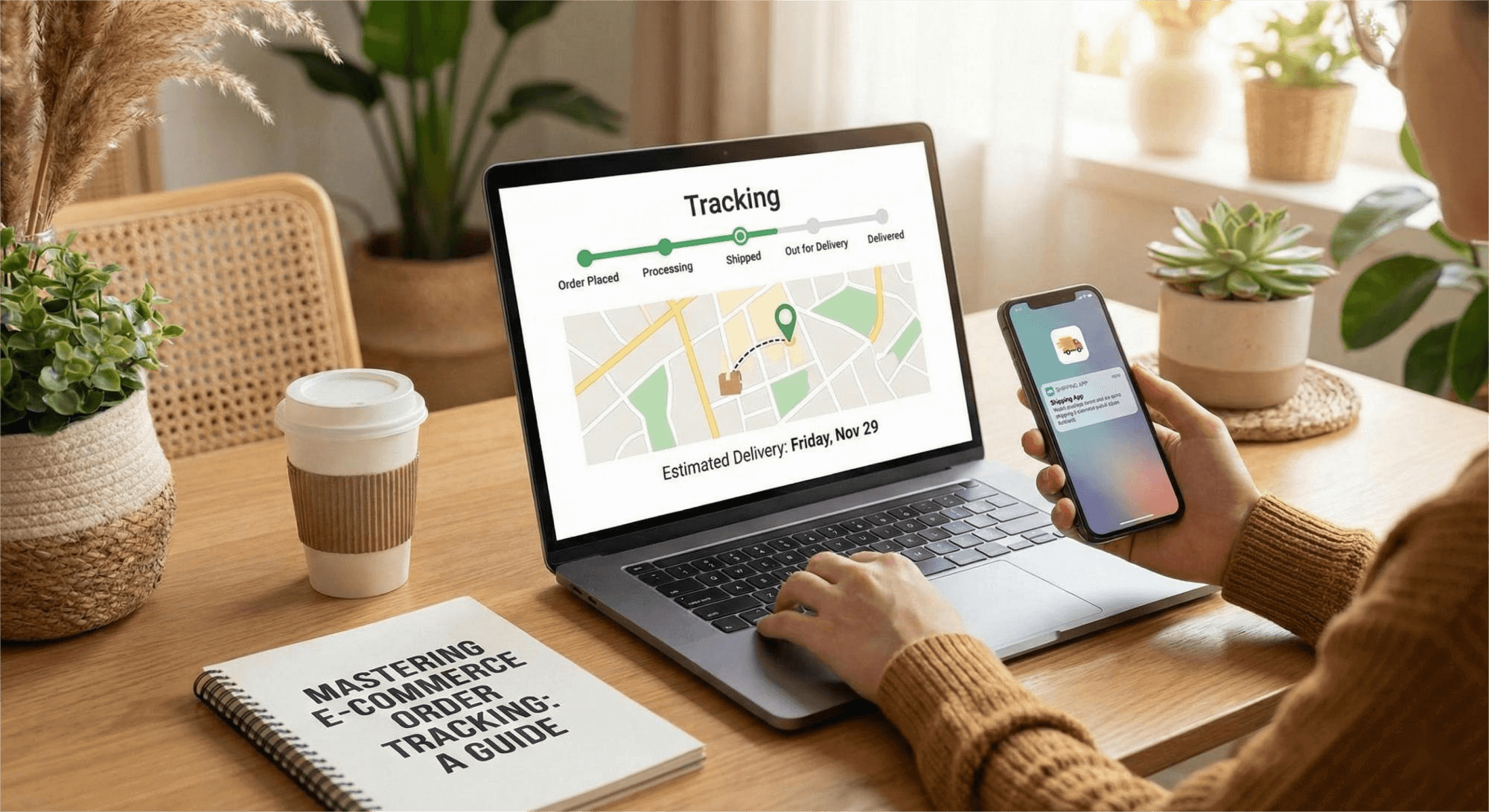
Ecommerce order tracking gives customers peace of mind by letting them follow their package’s journey in real-time. It offers updates at every critical step—from the moment the order is confirmed and packed, to when it ships, and finally, arrives at their doorstep.
If you like ordering pizza and have used a pizza tracker, you already know how this works. A standard tracking update includes a few important details:
- a unique tracking number for the package
- the package’s current status and location
- an estimated delivery date
- a direct tracking link
Here’s a fun fact: it wasn’t like this years back. USPS started offering basic tracking updates long before ecommerce existed, but the experience was slow and limited.
Then, Amazon came and introduced a simple, fast, and better digital tracking directly from their site, and Walmart, Best Buy, and other major ecommerce businesses followed after that.
Why Order Tracking in E-commerce Matters
For years, we’ve been told that the only thing customers care about is fast shipping. But the latest data tells a different story.
According to McKinsey & Company, consumer priorities have flipped. In just two years, Speed of Delivery dropped from the #1 priority all the way down to #5. Meanwhile, Transparency shot up to take the #2 spot.
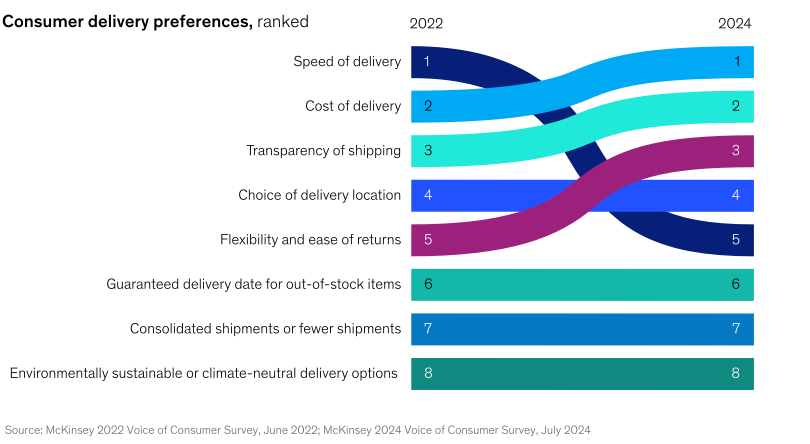
This shift signals a new reality: Customers would rather know exactly where their package is than get it immediately.
Your customers are actually willing to wait a few days for their package, but only if you keep them in the loop. They prefer the peace of mind of a clear tracking update over the stress of radio silence.
Today, a great tracking experience isn’t just a nice-to-have feature; it’s exactly what your customers are asking for.
How “WISMO” Inquiries Drain Your Profit
Order tracking solves the single biggest headache for support teams: WISMO (“Where Is My Order?”) tickets.
According to reports by Verte, shipping anxiety is real: 90% of shoppers actively track their packages, and a staggering 38% check for updates every single day.

If you don’t offer proactive updates, that anxiety turns into an inbox flood. When customers are left in the dark, they naturally assume the worst:
- Did they miss my order?
- Did the carrier lose it?
- Did I just get scammed?
The result is a wave of avoidable support tickets that eat up your team’s time and budget. By providing clear visibility, you stop the panic before it starts. This will save your support team from burnout and protect your brand from negative reviews.
Take our client, SHEIN, for example. Before implementing TrackingMore’s order tracking solution, SHEIN suffered from a massive influx of support requests that swamped their service teams.
By keeping their customers informed of their package statuses, they reduced 60% WISMO calls and improved efficiency by 5X.
It’s a win-win: a great tracking experience keeps your shoppers happy and your support costs down.
How to Build a Perfect E-commerce Order Tracking Experience
Okay. Now that we covered what ecommerce order tracking is and why it matters, let’s get into how you can actually provide the perfect order tracking experience. You can follow these three simple steps:
Step 1: Create a Branded Tracking Page
One big NO as an ecommerce store owner is sending your customers to a generic FedEx, UPS, or USPS site. Because the moment you do that, you lose control of the experience. You miss the chance to turn that excitement about their delivery into a second purchase.
The smarter move is to host a tracking page directly on your own domain (e.g., yourstore.com/tracking). Treat it just like your Homepage or Product pages: customize it with your logo, brand colors, and navigation so it feels like a natural part of your shop.
Here’s a good example of an effective branded tracking page:
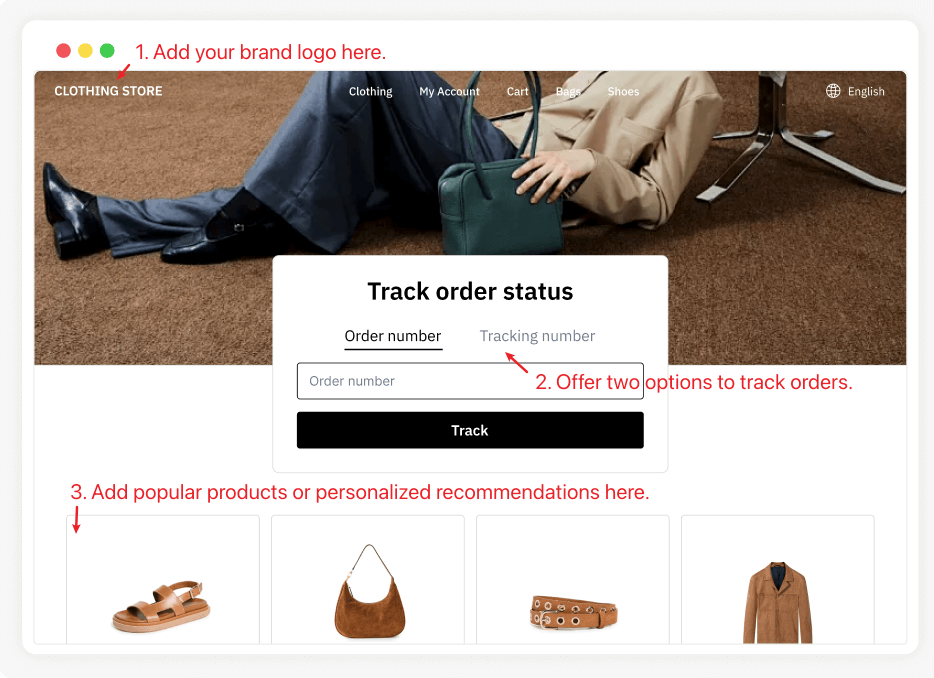
Besides providing the order tracker, you can also add product recommendations or use AI to promote items your customers might be interested in.
This way, branded tracking pages can keep customers engaged with your brand and turn passive traffic into repeat sales.
Step 2: Send Proactive Email and SMS Updates
A tracking page allows customers to check their status whenever they want. But to give them total peace of mind, you need to reach out proactively to keep them in the loop.
You can use a tracking platform to automatically trigger notifications the moment a carrier updates the package status. However, there is a catch: You shouldn’t just turn on every possible alert.
We’ve all been there—getting bombarded with notifications because a package moved two inches inside a sorting facility. It’s annoying, and it trains customers to ignore your emails. You need to configure your platform to select exactly which statuses trigger a notification.
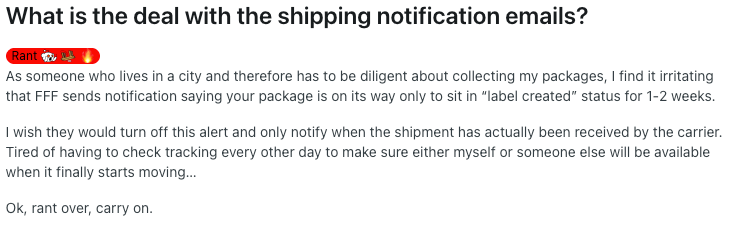
The ideal frequency often depends on what you are selling:
- For high-ticket items (like jewelry or electronics): Customers are anxious. They want to know every step of the journey.
- For everyday items (like apparel or consumables): Customers usually just want the highlights: “Shipped,” “Out for Delivery,” and “Delivered.”
The channel to connect with customers also matters.
As previous Verte’s report shows, 38% of shoppers prefer text updates rather than email notifications. Also, based on Sender’s open rate statistics, SMS messages have a 98% average open rate, and 90% of users read them within just a few minutes.
That makes SMS the perfect tool for your most urgent updates. While email is fine for the basics, you should rely on text messages for critical statuses like “Out for Delivery” or “Delivery Exception.” This guarantees the customer sees the update and takes action immediately.
Step 3: Connect Your Store with a Tracking Platform
To make your branded page and automated notifications work, you need a central hub that pulls real-time data from the carriers.
Most ecommerce platforms (like Shopify, BigCommerce, or WooCommerce) offer basic shipping integrations, but they often have a blind spot. They typically sync well with the major giants (like UPS or FedEx) but struggle with local couriers or smaller niche carriers. This often leads to “missing information” gaps where you and your customers are left in the dark.
This is why you need a dedicated tracking platform.
TrackingMore connects to 1,500+ global carriers, including the major players and niche local couriers. You will never experience the frustration of ‘tracking number not found’ errors again.
Inside the platform, you gain a centralized dashboard to manage your shipments. Simply import your tracking numbers, and our system will automatically detect the carrier and update the latest statuses in real time.
We also provide the essential post-purchase tools—like the branded tracking pages and automated shipping notifications—that we discussed in the previous steps.
How to Solve Common Order Tracking Headaches
Here are three common order tracking headaches you need to know and how to solve them:
1. Tracking Info Is Wrong or Stuck
Sometimes tracking stops updating or shows the wrong status. Most of the time, that’s an issue on the carrier’s side, and not yours. But customers will still reach out to you, and how you handle it matters.
The best approach is to proactively monitor your shipments to catch issues before your customers do.
With TrackingMore, you can automate this process. The system monitors your shipments 24/7 and sends you real-time alerts based on your own custom rules. You can define exactly what counts as a “problem”—whether that’s a package sitting in one spot for more than 3 days, or a shipment that hasn’t been scanned 24 hours after the label was created.
For example, let’s say you set a rule to flag any order stuck in “In Transit” for more than five days.
- A tracking alert pops up in your dashboard automatically.
- You see it and call the carrier immediately to resolve the hold-up.
- You send the customer a quick email explaining that you noticed the delay and are already fixing it.
This level of proactive care shows your customers that you’re on top of their orders, so even when things go wrong, they still feel taken care of and continue to trust you.
2. Deal with Delivery Exceptions
Another common order tracking headache is delivery exceptions. It could be a customs delay, a failed delivery attempt, or a damaged package that stops a shipment from reaching your customer on time.
If you don’t act fast, that package is often returned to the sender, which will double your shipping costs and frustrate the customer.
The most efficient way to address delivery exceptions is to push real-time alerts to all stakeholders.
First, your fulfillment team can step in and handle the logistics immediately—like contacting the carrier to provide missing documents. If they can fix the issue behind the scenes, the customer never even needs to know there was a hiccup.
However, if the issue requires customer input (like an incorrect address), your agents need to know instantly so they can reach out to the customer and ensure a successful delivery before it’s too late.
Don’t forget to look at the big picture. Use your tracking data to monitor carrier performance. If you notice a specific carrier has a high rate of damaged or failed deliveries, you have the concrete evidence you need to switch providers and protect your bottom line.
3. Tracking Orders from Multiple Stores in One Place
If you are like most growing merchants, you probably don’t just sell on one site. You might have a main brand site on Shopify, a storefront on Amazon, and maybe even a rising channel on TikTok Shop.
While this maximizes your sales, it can make logistics a nightmare.
You have to log into different portals to check the status of your shipments. This is inefficient and prone to error. Your support team also needs to waste hours switching tabs to answer basic WISMO queries.
The solution is to centralize your tracking information to one center.
A robust tracking platform allows you to connect multiple store accounts into a single dashboard. Whether an order comes from eBay, WooCommerce, or your custom app, it all flows into one unified view.
If you manage shipments in your own system, you can choose platforms that offer an API solution, so that you can integrate tracking data seamlessly into your existing ERP or OMS.
How to Choose the Right Order Tracking Platform
Now that you know how a tracking platform benefits your business, it’s time to explore the best shipment tracking solutions.
Must-Have Features of a Good Order Tracking Platform
While each business has its own requirements, a strong order tracking system should include the following features:
- Integration with a wide range of carriers so you can track all shipments, regardless of which carrier you use.
- A customizable branded tracking page, ideally with pre-built templates and drag-and-drop tools, so you can build it without developer support.
- Automated email and SMS notifications to keep customers updated on their order status.
- Delivery date estimates (e.g., “Arriving Tuesday, May 15th”) visible on product pages or during checkout.
- Tracking API that lets you incorporate tracking data into your own systems to automate workflows and improve efficiency.
Three Types of Order Tracking Solutions
Before choosing a tracking solution, it’s important to know exactly what you need. If all you want is to give your customers important updates on their orders, a simple tracking app might do the trick. But if tracking is eating up your team’s time and driving up operational costs, you’ll likely need a more professional solution.
There are three main types of tracking solutions on the market, each built to address different business needs:
1. Order Tracking Apps or Plugins
Easy to install and often budget-friendly, these tools add tracking functionality directly to your existing store or website. They’re great if you just need to send basic order updates to customers.
2. Dedicated Order Tracking Software
These are full-featured platforms built specifically for order tracking. They offer advanced features, detailed analytics, and the flexibility to handle high volumes of shipments across multiple carriers.
3. Shipping Software with Tracking
Many shipping platforms include built-in tracking features as part of their service. This is convenient if you’re already managing shipments through the same system and want tracking integrated with your shipping workflow.
| Category | Best for | Examples |
| Order Tracking Apps or Plugins | Stores built on Shopify, WooCommerce, etc. | Parcel Panel Sign up for a 30-day free trial> |
| Dedicated Order Tracking Software | Stores shipped with multiple carriers; want to improve their shipment tracking efficiency; want a premium, branded customer experience. | TrackingMore Sign up for a 14-day free trial> |
| Shipping Software with Tracking | Stores that want to manage everything from label printing to tracking in one place. | ShipStation, Shippo |
You may be interested in:
Top 10 Best Order Tracking Software in 2025 [Free & Paid]
Key Takeaways
At the start, we talked about how every shopper really just wants to know two things after they buy: “Where is my order?” And “when will it get here?” By now, you have a complete playbook to answer those questions and avoid the cycle of support tickets, bad reviews, and lost sales.
Here are the most important takeaways to keep in mind:
- Own Your Brand Experience: Never send customers to a carrier’s website. A branded tracking page is one of your most valuable post-purchase assets.
- Communicate Proactively: Send updates before customers ask. Automated notifications, especially during delays, are how you build long-term trust.
- Choose the Right Tool: The right platform automates everything in the background, saves hours every week, and makes your store look professional from day one.
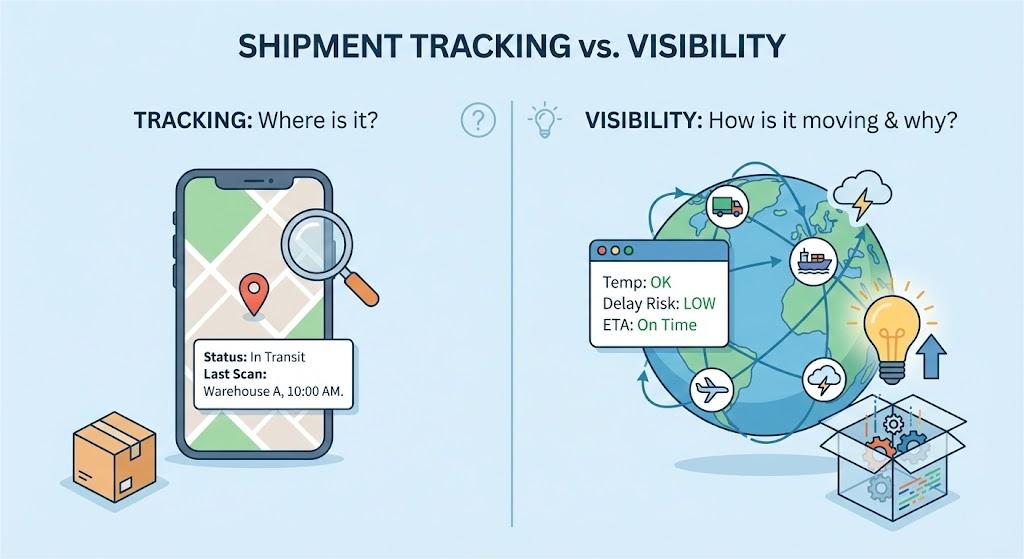
Shipment visibility isn’t just about knowing where a package is. It’s a part of the customer experience that influences trust, loyalty, and repeat purchases.
E-Commerce Order Tracking with TrackingMore
At TrackingMore, that’s exactly what we help you do. Our system connects with 1,500+ carriers and offers branded tracking pages, automated shipping notifications, and advanced features like automatic carrier detection and custom tracking events.
Our solution is trusted by 10,000+ brands worldwide. Ecommerce businesses use TrackingMore to give their customers accurate and timely tracking updates. This helps improve customer satisfaction and build brand loyalty. Our tracking service is so reliable that even logistics companies and software providers use it to save on development costs and grow their business.
Ready to transform your e-commerce order tracking and take your post-purchase experience to the next level?
Easton has 3 years of experience researching and writing about e-commerce and logistics. She enjoys sharing the latest industry trends and insights with readers.